Content & Media Recovery Toolkit
The words. The images. The whole picture.
A useful backup carries the parts that make the site yours. This tiny sample pairs content with a media record.
Choose an intact or damaged sample →
Check every piece.
Try both files. One passes; one stops at the gate.
Run the check to calculateWaiting for the sampleTry it here. Sample changes stay in this page and reset when you leave.
Check the complete file before accepting what’s inside.
ImplementedInside the codeSanitized excerpt +
Require the final receipt
Excerpt from the streaming importer. Digest, counts and size checks run earlier in the same import; comments summarize that context.
importArchive · completion gate// Earlier: parse records and verify digest, counts and limits.
if (pending.length || !end) {
throw invalid(
'The recovery file is incomplete. The import was not activated.'
);
}
await onComplete({
header,
receipt: end,
compressedBytes: compressed,
expandedBytes: expanded
});
Details & evidenceThe deeper read +
The reusable recovery package and portfolio adapters have passed local export, import, and exact-byte restoration checks. Browser file-selection acceptance and the hosted owner restoration exercise remain separate gates. Recovery archives are private owner data and are not offered for public download.
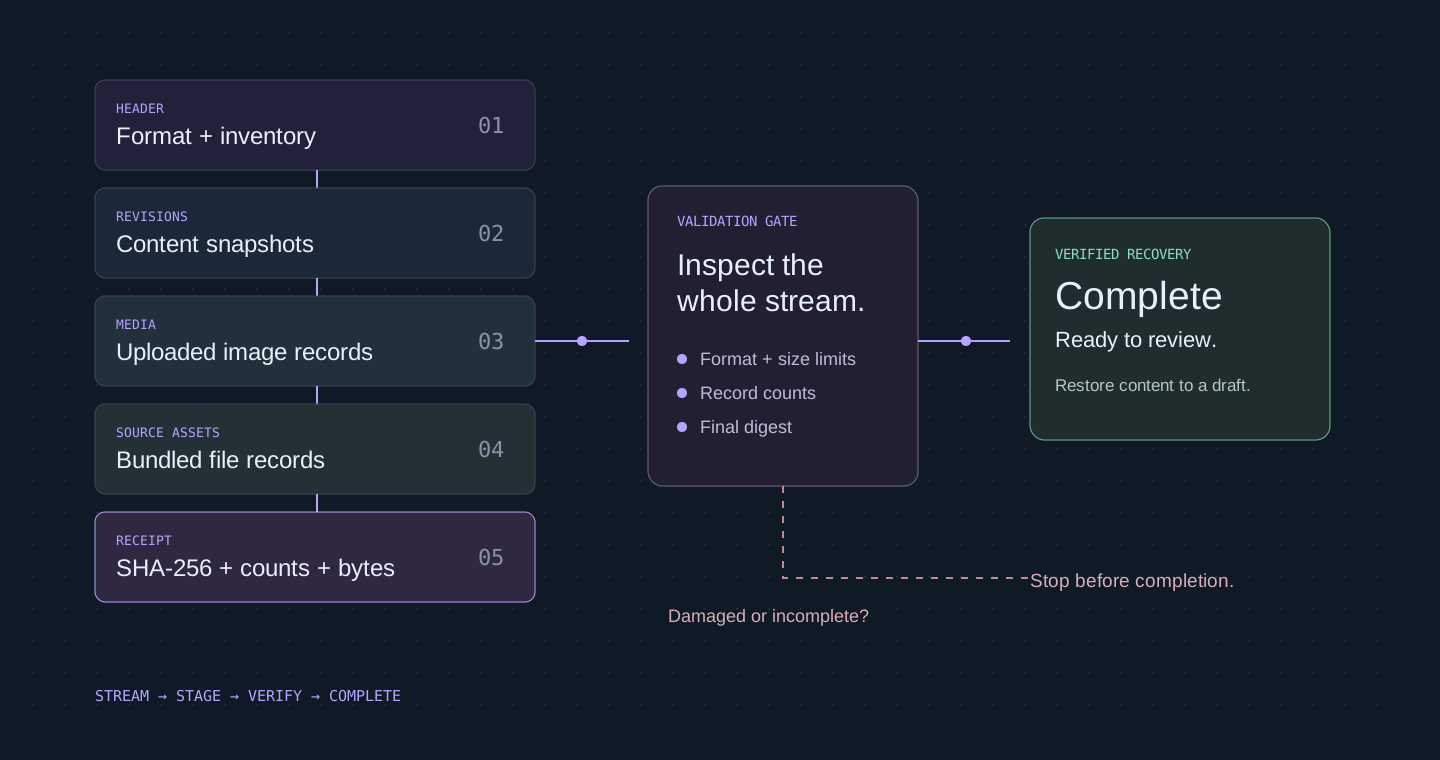
01A repository is only one part of recovery+
Application code, published content, drafts, revision history, and uploaded images can live in different places. Restoring only the repository may leave the website incomplete. I built a recovery path that carries the editable state and its media together while keeping the matching application source as a separate, versioned dependency.
02Stream the package+
The Node.js package writes a compressed sequence of structured records. It works with asynchronous streams so the complete archive does not need to be held in memory. Records describe the document, historical revisions, and media, followed by a completion receipt that lets the reader verify that the export finished.
03Validate before activation+
Imports check the format, record limits, counts, byte lengths, and integrity digests. The portfolio adapter also validates document structure, media inventory, image decoding, and allowed asset paths. An interrupted, malformed, or conflicting import remains staged privately instead of replacing an existing published website.
04Restore a draft, then decide+
A successful import restores editable draft state. Publication is a separate validated action. Historical snapshots are retained with their provenance and can be restored into a new current revision. This gives the owner a chance to inspect recovered content, images, and page behavior before visitors see any change.
05Preserve media and bundled assets+
The current format covers managed images and the application’s registered bundled public assets. A separate extraction command can restore bundled files into a new directory while validating their paths and bytes. Application code and runtime credentials are outside the package; a complete recovery still uses the matching source backup and owner-controlled configuration.
06Keep storage replaceable+
The core archive format is independent of React and the portfolio database. Adapters translate storage-specific documents, revision records, and media objects into the stream. That separation makes the package useful for another personal application without copying the entire portfolio or its administration interface.
07Test failure as well as success+
Verification restores content and images into fresh local storage and compares the recovered bytes. It also exercises truncation, checksum damage, media collisions, concurrent edits, and transaction failures. A full local application round trip preserved revisions and media, then restored the original baseline; exporting alone was not treated as proof of recovery.
08Know what the evidence means+
A generated file, a verified import, a backup copied to its destination, and a successful owner recovery exercise are different events. The tooling reports those boundaries explicitly. Exported private content requires protected storage, and the public case study describes the design without exposing recovery files or operational access details.
SourcesImplementation and bounded verification
- Implementation and bounded verification
- Reviewed editor, application, and verification source. This story distinguishes implemented capabilities from pending integration and owner acceptance.
Node.js · Streaming data · JSON · Content validation · Storage adapters