miguel.systems Studio
Change the draft. Keep the site live.
A small edit shouldn’t feel like a launch. Give this sample a new headline. The live version stays put.
Type a headline in the draft →
Small notes. Useful ideas.
Edit the draft. Your sample live page stays unchanged.
Try it here. Sample changes stay in this page and reset when you leave.
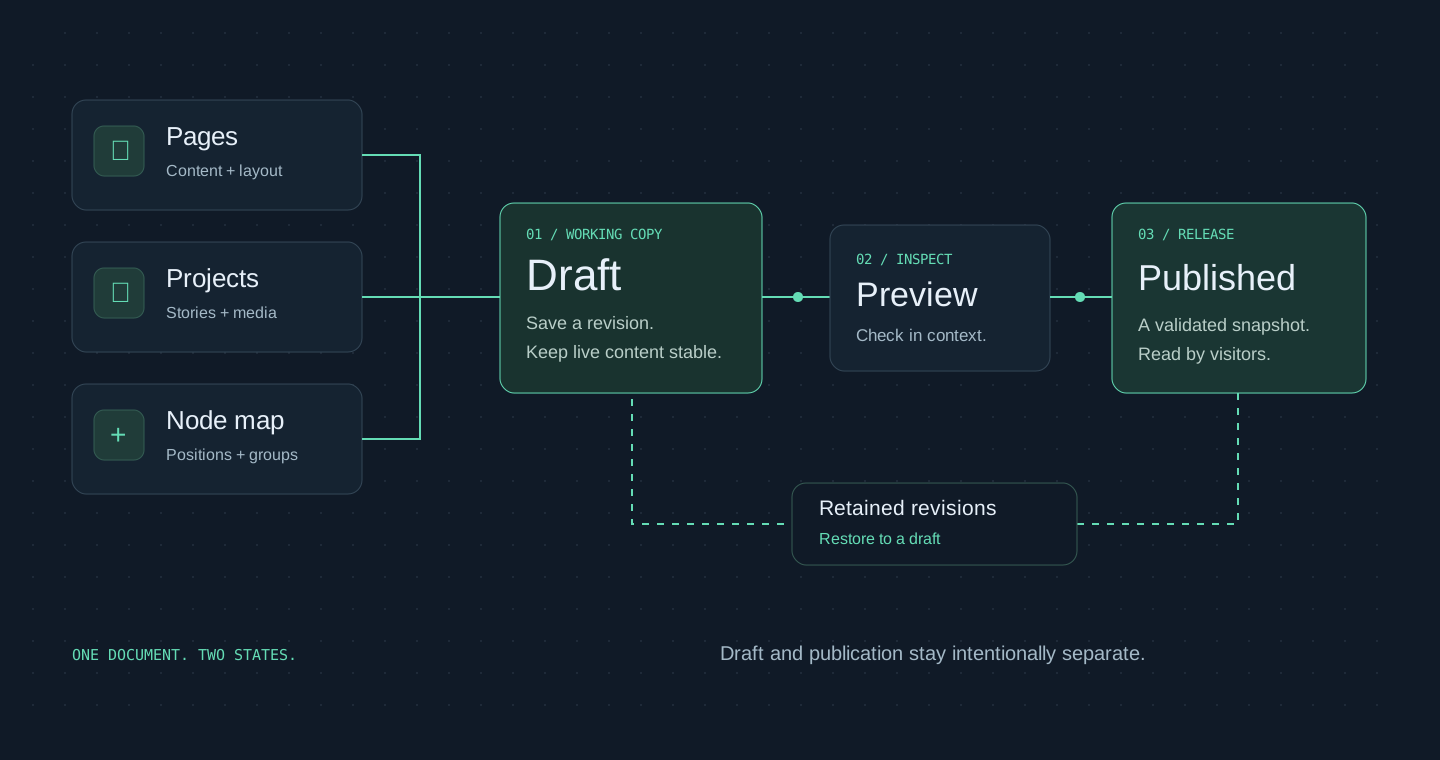
One place to shape the site. One deliberate moment to publish it.
In developmentInside the codeSanitized excerpt +
Reject a stale publication
Condensed implementation excerpt. Storage details and operational identifiers are omitted.
ContentStore.mutate · publication branchconst state = await this.read({ history: false });
if (state.revision !== revision) {
throw new ConflictError();
}
const next = this.validate(state.draft);
assertJsonBytes(next, DOCUMENT_BYTES, 'The site document');
// The write also compares the revision atomically.
// A retained snapshot accompanies each successful change.
Details & evidenceThe deeper read +
The private application is deployed and its core editing workflows have been verified locally. Hosted owner acceptance and connected Google reporting remain in progress. This case study presents product design and engineering decisions; the administration service and its records are not a public demonstration.
01The problem: the website outgrew its editing workflow+
A portfolio with interactive stories, a movable node explorer, project galleries, and archived websites needs more than a collection of text fields. Repeated catalogs make a simple correction difficult to apply consistently. I designed Studio around the owner’s actual tasks: find a page or project, make a change, inspect it in context, and choose when visitors should see it.
02One content model across several experiences+
Pages, project records, website variants, node settings, and shared site content live in a versioned document. The reading pages and explorer consume the same published model. A project title or description can be edited once while each surface retains its own layout and interactions. The content remains exportable instead of being confined to a proprietary editing service.
03An editor organized around the site+
The workspace separates Pages, Nodes, Projects & Archives, Media, SEO, Analytics, Releases, and Settings. Global navigation, footer information, résumé links, project stories, galleries, and appearance settings have dedicated editing paths. Visual controls work alongside structured forms so the owner can choose the most appropriate way to change content.
04Node controls with a clear owner boundary+
The node editor manages collection membership, labels, imagery, order, authored positions, emphasis, color, scale, camera framing, motion, and interaction preferences. Owner defaults and visitor rearrangements remain separate. Collection links describe genuine membership, while Find, keyboard controls, and the phone experience provide other ways to reach the work.
05Preview, publish, and recover+
Draft changes remain private until publication. Revision checks identify conflicting edits, and validation happens before a complete revision becomes public. Failed publication leaves the previous release available. The local workflow covers saving, refreshing, previewing, publishing, and restoring a previous state; session expiry and concurrent edits are included in that verification.
06Measurement with honest evidence+
SEO tools inspect canonical routes, metadata, indexing, and dated performance diagnostics. Reporting distinguishes unavailable data from a successful result. Google reporting is a connection workflow under development, not a claim that live analytics are already populated. A technical SEO score is evidence about checks, not a promise about rankings or business outcomes.
07A reusable foundation+
The visual editor, renderer, content layer, and recovery format are separate packages with a portfolio-specific integration. Storage is accessed through adapters. An independent sample exercises reuse outside this site, while the portfolio retains its existing React behavior. Authentication, draft access, and publication decisions are enforced on the server.
08A production incident on iPhone+
After a content-loading change, the portfolio homepage sometimes flashed into view and then failed during startup on iPhone. Refreshing could trigger the failure even after a successful visit. Browser Lab still worked. The requirement was to restore the animated homepage and free exploration, not replace them with a permanently simplified phone experience.
09From a blank screen to actionable evidence+
The first recovery work made failure visible and kept a reading view available; it did not resolve the cause. Opt-in diagnostic reports added a build identifier, stable error code, browser capabilities, and sanitized stack locations. Mapping those locations to the exact release first pointed to navigation initialization. A targeted correction moved the failure to a React reference in the same shared header, showing that the problem extended beyond menu data. Normal browser feature probes passed. Cold loads, cached refreshes, and delayed content requests became separate test cases.
10The cause: asynchronous module initialization+
The evidence pointed to a startup race after published content began loading through top-level await in a shared browser module. Concurrent imports could expose module references before initialization completed on affected WebKit versions. The changing failure locations and the upstream WebKit report “Fixing top-level await in Safari” supported that diagnosis. The exact natural phone timing was not reproduced in the local browser engine, so the explanation is an evidence-backed diagnosis rather than a claim of a deterministic laboratory reproduction.
11The solution: initialize content before the application+
Startup now loads and validates one immutable published content snapshot before importing the React application. Shared content modules initialize synchronously. A build check rejects top-level await in browser chunks, and an entry-contract check prevents silent drift in the startup integration. Recovery can render before React starts, while server-rendered reading content remains available if enhancement fails. The existing animations, menus, and free-explore interactions were preserved.
12Verification beyond a successful first load+
The corrective release passed 154 automated tests, build, type, and lint checks. WebKit and Chromium checks covered initial loads and five cached reloads, delayed or failed content requests, navigation, and free-explore controls. Responsive checks covered small phones through desktop widths. These were browser tests, not a substitute for a physical device. The owner then confirmed successful use on iPhone in both Chrome and Safari and reported successful visits on other people’s phones. That real-device feedback closed this incident; broader dashboard acceptance remains separate.
13Useful diagnostics without collecting private records+
Diagnostics are assembled locally from a limited set of allowed fields, and the visitor chooses whether to copy a report. They exclude credentials, cookies, stored visitor content, and raw error-message payloads. The public case study explains the engineering decisions without publishing private administration routes, infrastructure identifiers, or client records. The lesson was to separate failure recovery from correction, verify startup ordering, and test refreshes as carefully as first visits.
14What this work demonstrates+
My contribution spans product structure, visual editing, content modeling, publishing behavior, and operational verification. The result is a working private foundation with explicit acceptance limits. Facebook Business and chatbot connections remain future extension ideas; they are not presented as active integrations.
SourcesImplementation and bounded verification
- Implementation and bounded verification
- Reviewed editor, application, and verification source. This story distinguishes implemented capabilities from pending integration and owner acceptance.
React · TypeScript · Node.js · Versioned content · SEO diagnostics